


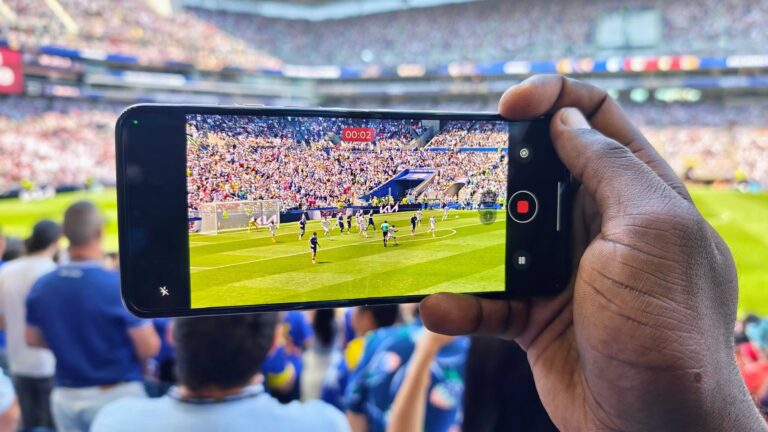
The whole world is watching soccer (or football, depending on where you are) right now, and I was fortunate enough to attend a game here in Seattle, courtesy of Motorola, the Official Smartphone Partner of the FIFA World Cup 2026. I took a few Razr phones with me, including the Razr Ultra 2026, the Razr Fold, and last year’s Razr Ultra 2025, to capture the game while using some of Motorola’s best camera features, and one of them happens to be heavily discounted for Prime Day.
The Razr Ultra 2025 launched in 2025 for $1,299, but thanks to Prime Day, you can get nearly half off at just $684. The Razr Ultra 2026 and Razr Fold aren’t on sale for Prime Day, but Motorola still has some enticing trade-in discounts and hundreds of dollars worth of freebies you can get if you purchase either phone.
You can also check out this incredible deal on the Razr 2025 FIFA World Cup Edition.
Motorola Razr FIFA World Cup camera samples
Image 1 of 13


Action Shot freezes each moment in time
Getting a good, clean image when players are constantly moving around can be tricky. Fortunately, Motorola’s Action Shot feature saved the day on multiple occasions by increasing the shutter speed and freezing every moment in time.
Fortunately, Motorola made the button easy to access, right in the bottom-right corner of the viewfinder. And if you have a Razr Fold, you can take Action Shot further by zooming into the scene, so you can really get the shot from way up in the stands.
Camcorder Mode gives you smooth video
If you prefer capturing video, Camcorder Mode is the best way to get smooth video. Just fold your phone at a 90-degree angle and begin recording. On the Razr Ultra 2025, you can slide your thumb up and down or forward and back to smoothly zoom in and out at any moment. With the Razr Ultra 2026, you can do the same thing by tilting the device slightly to either side, all while keeping the video locked to the horizon with Horizon Lock.
And don’t forget to turn on Dolby Vision for an extra pop of color, and make sure your resolution is set to 4K60 for extra smooth video.
Active Photos gives each image more context
Capturing fast-moving images and high-quality video is one thing, but Active Photos is a sweet in-between that captures the moments before you snap the photo. This is perfect for intense moments, especially if you capture someone scoring a goal, giving you additional context leading up to that special moment.
This feature is easy to access on the Razr Ultra 2026 and Razr Fold; just tap the Active Photos icon above/next to the viewfinder (two circles and a dot). After you capture each Active Photo, you can tap the Motion button while previewing it in Google Photos to play the video, and choose to save the moment as a separate still, a GIF, or a video. Just remember to turn on Active Photos when you return to the camera app, as it doesn’t stay on.
The Cover Screen lets you take the best selfies
Perhaps my favorite way to use the Motorola Razr flip phones is to take selfies with the rear cameras and the cover screen. The external display serves as a viewfinder, allowing you to take high-quality selfies without opening the phone. You can also do this when taking photos of others: just turn the external viewfinder on using the button in the top-left corner, and your friends can see themselves before you snap the photo.
But for the best zoom…
The Razr Ultra flip phones have a decent zoom range for photos and video, but if you want some serious close-up action, you’ll want the Razr Fold. I was able to capture some great images of the players and spectators with up to 10x zoom. With Super Zoom Pro, the Razr Fold can also take incredible photos at up to 50x zoom, but I found I didn’t need it here. Still, the option to use up to 100x zoom is here, and whether you’re shooting close-up images or video, the Razr Fold can get the job done.