


There’s a decent selection of Wi-Fi security cameras available, and I tested various Reolink and Baseus models in the last two years. But if you need 24/7 recording and local storage, the best choice is to get cameras that can be plugged in and connect these to a dedicated network video recorder (NVR).
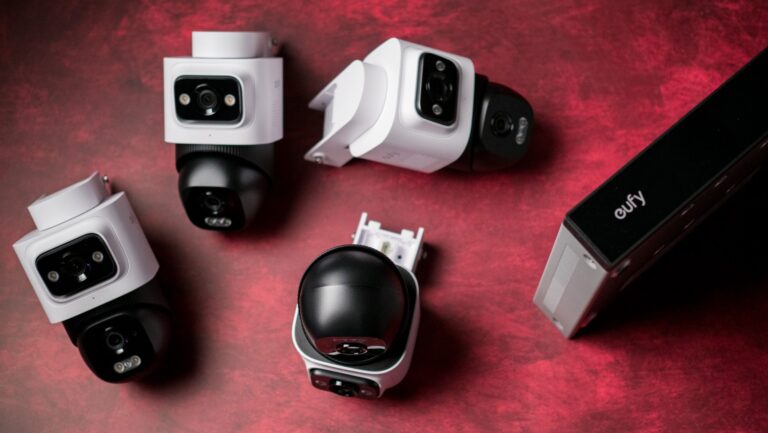
This is where the Eufy Security NVR System E50 comes in. It is an all-in-one system that includes an NVR, a 2TB hard drive, four E50 PTZ (pan-tilt-zoom) PoE cameras, and all the accessories you need to install the cameras. The entire bundle costs $1,199, but AC readers can get it for $839 by using code EUFYNEWPOE — that’s a $359 discount on a subscription-free security camera bundle. The code is valid on Amazon as well if that’s your prefer choice of retailer.

Let’s go over the basics, because the E50 system comes with a lot of stuff. The E5 NVR is the center of the hub, and this is what you connect the cameras to, and store your recordings. It also has a 3.5-inch hard drive bay, and it comes with a 2TB drive installed out of the box.
Latest Videos FromAndroid Central
If you’re planning on adding cameras down the line (there’s also an 8-camera version), or just need to store recordings for longer, you can take out the installed drive and slot in your own — the NVR holds up to 16TB drives. Just to give you an idea, the default 2TB drive easily holds three months’ worth of recording when using all four cameras.

The NVR comes with HDMI and Ethernet connectivity, one USB-C and two USB-A ports. The defining feature is eight PoE ports, allowing you to connect eight cameras to it without any issues. It has enough power to drive all eight cameras (it has a 90W power brick), and you can easily set up the NRV and view footage from the cameras by connecting it via HDMI to a monitor — you don’t get a monitor bundled with the box, but there is a mouse.
Then you get the four cameras, and all the accessories to mount the cameras. There’s a water-resistant housing, positioning stickers, screws, and four 59ft (18m) Ethernet cables. I didn’t need the cables as I have Ethernet cabling running outside, so I was able to connect the cameras relatively easily to the NVR and set everything up without any hassle.
Talking about setting things up, you will need to install the Eufy app to configure the E50 system. I would’ve preferred a web portal, but that isn’t available, and you need to use the app or connect a mouse and monitor to the NVR and configure it locally over your network. The app itself has a ton of features, and it was easy to set up the NVR and configure the cameras. The power-over-Ethernet cameras need just the Ethernet cable to provide power and transfer data, and while it is a hassle to run cabling to the desired outdoor locations where you intend to mount the cameras, it’s a one-time chore.
The E50 cameras have dual lenses — a 2K fixed lens with 180-degree field of view, and a 4K movable lens with 360-degree rotation with 65ft range and 5x zoom. With four cameras connected to the NVR, I was able to cover the entire outer area of my house. Eufy has a nifty OmniTrack feature that dials in on a subject when it detects motion, and it does a good job in this regard. You can set up familiar faces and exclusion zones with relative ease, and the cameras deliver clear footage even at night.

There’s on-device AI as well (obviously) that’s used to identify and frame subjects, and while I dislike shoehorning AI into every consumer product (these features existed before AI was a thing), I’ll admit that Eufy has the basics covered. The E50 system gets multi-device view, cross-camera tracking, secure transmission of video feeds, and alert schedules.
In real-world use, the E50 did an admirable job; the cameras deliver clear footage, and I got instant alerts whenever they detected motion. Image quality is great, and I like using PTZ cameras because of the flexibility they provide — the secondary moving lens is great for tracking motion. I had no issues accessing alerts and camera feeds outside my home as well. Eufy finally uses end-to-end encryption (which is the reason I was willing to use these cameras), and while the brand took a while to rectify earlier mistakes, the E50 system doesn’t have any security issues.

If anything, the only problem I have with the E50 cameras is that they don’t integrate with the RTSP protocol. We moved to a new house last year, and I set up a DVA3221 NVR with 32TB storage and went with Reolink cameras. I did so as the brand has several cameras that use RTSP, and this allowed me to connect the cameras to the NVR and record footage with ease. Thankfully, Eufy says it is enabling RTSP in the coming months, and I will update this post once I use it with my NVR.
Look, if you’re starting out and want an all-in-one solution with secure access, there’s no doubting that Eufy did a great job bundling all the products you need. Oh, and if you want to add indoor cameras down the line, there’s a Wi-Fi Module that lets you connect Eufy Wi-Fi cameras to the NVR, and that’s good to see. Wi-Fi cameras are inherently more annoying to use — I hated the Nest Outdoor Cam — but they are a better choice indoors as you don’t need to run cabling.

I get that even the discounted $840 price is quite a lot of cash to pay for a security system, but the E50 is designed to last, and it is more affordable in the long-term than using any Wi-Fi cameras that run on subscriptions, like Nest or Ring.
Not having to charge the cameras is a huge bonus, and you can be safe in the knowledge that all recordings are stored locally and not on a cloud server somewhere. You get actionable insights, Eufy’s multi-view feature is pretty great in its own right, and the cameras deliver clean footage even at night. On the whole, it’s a good choice if you need an all-in-one security camera system to cover your home and yard.

Eufy
E50 Security Camera System
Eufy did a good job with the E50 security system, and if you need local footage and a dedicated NVR, you can get the entire bundle for $839 by using code EUFYNEWPOE.