


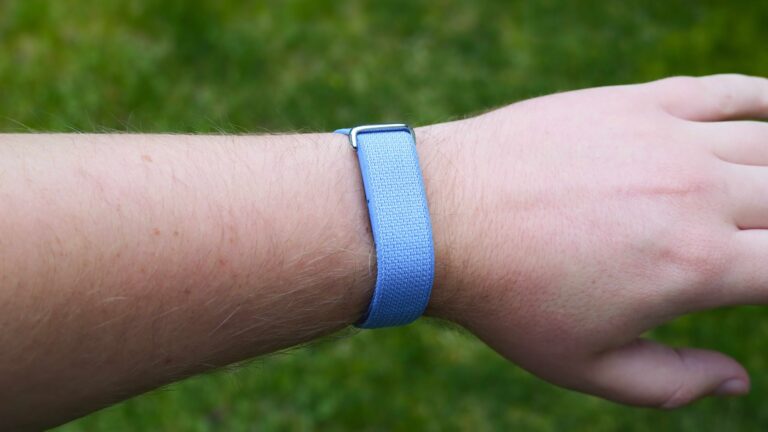
Google has a new screenless fitness tracker that passively records health data while staying out of the way. It’s called the Fitbit Air, and it’s a Whoop challenger that only costs $99 with no required subscription. With no screen or physical buttons, you’re relying on the Google Health (formerly Fitbit) app to change settings, start workouts, and set up features.
If you just got a Fitbit Air, these are the seven things to do first immediately after unboxing it. They’ll help you learn the Fitbit Air’s features and give you a quick tour of the redesigned and rebranded Google Health app. Let’s dive in.
Set up morning alarms

The Fitbit Air is limited in hardware, so you won’t get notifications or many smartwatch features from this fitness band. There is one feature worth calling out: alarms. With a vibration motor and other sensors inside, the Fitbit Air can vibrate as an alarm on your wrist and stop the alarm when the wearable is double-tapped. You can set up to eight alarms in the app when the Fitbit Air is close to your phone.

You’ll need to open the Google Health app and tap the Connections button in the top-left corner of the app homepage. Then, press Fitbit Air in the devices list. Next, tap Alarms and then Add a new alarm to create one. You can set the alarm time and the days of the week that the alarm will be active.
There are two alarm settings to be aware of: Repeat alarm and Smart wake. Repeat alarm will automatically repeat an alarm nine minutes after it originally goes off if there isn’t a double-tap from the user. Smart wake will try to wake you up to 30 minutes before the exact alarm time, optimizing the alarm for your sleep cycle.
The Fitbit Air’s minimalist design makes it perfect for sleep tracking, and it’s nice to see a built-in alarm that might wake you more gently than an audio-based one.
Choose a wrist preference

Part of setting up a new Fitbit Air is telling it your preferences. That includes letting the Google Health app know which wrist you’re wearing the Fitbit Air on. Whether it’s your left or right wrist doesn’t matter, but the app wants to know if it’s on your dominant or non-dominant wrist. I wear mine on my dominant wrist, so I can still use a traditional watch or a regular smartwatch on my non-dominant wrist.
You can update your preference by navigating through Google Health app > Connections > Fitbit Air to start — this goes for every Fitbit Air device setting or feature, but I’ll keep highlighting these steps for simplicity. Then, press Device preferences. Tap Wrist preference and choose either dominant or non-dominant. You might be asking, why does the app need to know this data point?
It’s because motion sensors inside the Fitbit Air are paired with a software algorithm to calculate daily steps and movement. You use your dominant hand much more throughout the day, even when you’re not actively moving. This can lead fitness trackers to add false steps to your total, but telling the Google Health app which wrist is being used will improve accuracy across the board.
Set a vibration intensity

While you’re inside the Device preferences settings page, you can adjust the Fitbit Air’s vibration settings. To get there, navigate to Google Health app > Connections > Fitbit Air > Device preferences and tap Vibration. You can turn off vibration alerts entirely here by flipping the toggle, and this may be preferred if you don’t need vibration alarms or similar haptic alerts.
If you do plan to keep using vibration alerts on your Fitbit Air, you can adjust their intensity. There are two options: High and Low. When you switch between the options by tapping them in the app, your Fitbit Air will buzz twice at the selected intensity. This will help you decide which one is right. You’ll see a Settings updated banner appear when your Fitbit Air vibration intensity preference is saved.
Share heart rate with apps or gym equipment

Another Fitbit Air feature you might not know about is real-time heart rate data sharing. This lets you use the wearable’s built-in heart rate monitor to share data with third-party apps and gym equipment. Fitbit Air will work with Peloton, Concept 2, Echelon, Hydrow, iFit (NordicTrack), Life Fitness, Matrix Fitness, Schwinn Fitness, Spinning, Strava, Tonal, Wahoo, and Zwift apps and hardware. Before you get started, you need to manually pair the fitness band with apps and devices.
Open your Fitbit Air device settings menu by navigating through the Google Health app > Connections > Fitbit Air. Then, tap Share heart rate. This will make your Fitbit Air visible to nearby equipment and apps over Bluetooth. Use the gym equipment or app to pair with the Fitbit Air. Follow the on-screen prompts to do so. You may need to confirm on your phone or match pairing codes.
If you use gym equipment frequently, you might want to keep your Fitbit Air visible to nearby apps and equipment all the time. You can do this by flipping the toggle beside Always visible on this page. However, Google warns that this may impact your Fitbit Air’s battery life.
Choose a main fitness goal

The next section of the Fitbit Air device settings menu worth your time is called Google Health reminders and alerts. This collection of options is crucial if you care about background health monitoring and warning notifications. To get there, navigate through the Google Health app > Connections > Fitbit Air and press Google Health reminders and alerts.
The first option is called Main goal. You can set your main goal as steps, distance, calories, and active zone minutes. This will inform the notifications you get from the Google Health app as you achieve your selected goal.
Get high and low heart rate warnings

Next, you can set up high- and low-heart-rate warning notifications. These are sent to your smartphone if your heart rate is high or low while you are inactive for at least 10 minutes. Navigate through the Google Health app > Connections > Fitbit Air > Google Health reminders and alerts, and press High & low heart rate. Here, you can flip the toggles beside Notification for high heart rate and/or low heart rate notifications.
By default, the Google Health app will calculate a custom high and low heart rate threshold based on your age and typical resting heart rate. However, you can choose a custom one. To do so, tap your high or low heart rate threshold and flip the toggle beside Use default off. Then, you can set a custom threshold for one or both.
Set up irregular heart rhythm notifications

Similarly, your Fitbit Air can look out for irregular heart rhythm patterns that may be signs of atrial fibrillation (AFib). Navigate through the Google Health app > Connections > Fitbit Air > Google Health reminders and alerts, and tap Irregular rhythm. Then, press Set up. An onboarding page will appear explaining that Google’s algorithm has been validated in a clinical study with a 98.2% positive predictive value. It’ll also explain atrial fibrillation, its seriousness, and the symptoms.
If you want to continue, tap Get started. You need to verify your eligibility by entering your date of birth and disclosing whether you’ve already been diagnosed with AFib. The feature isn’t available to those under 22 or with a prior AFib diagnosis. Tap Next to read the explainer and data collection policies, then tap Allow to continue. Press Next one more time after reading the page, and finally hit Turn on feature.
You’ll then see a few very important warnings. You can still have AFib without receiving a notification, and some people with AFib don’t have any symptoms. The feature doesn’t check for heart attacks, strokes, or other heart conditions. It also reminds users to talk to healthcare providers about any notifications they receive.
By now, you’ve taken the Google Health app for a spin and set up critical Fitbit Air settings and features. You’re ready to start tracking workouts, recording your sleep, and monitoring your health. If you don’t have a Fitbit Air yet, maybe this walkthrough helped you figure out whether this $99 band is worth your money.

Screenless fitness tracker
The Google Fitbit Air is a minimalist fitness tracker that passively records health data on your wrist. With seven-day battery life, you can wear it for days without worrying about charging. It connects with the Google Health app and can be used in tandem with a Google Pixel Watch.