October 10, 2026:


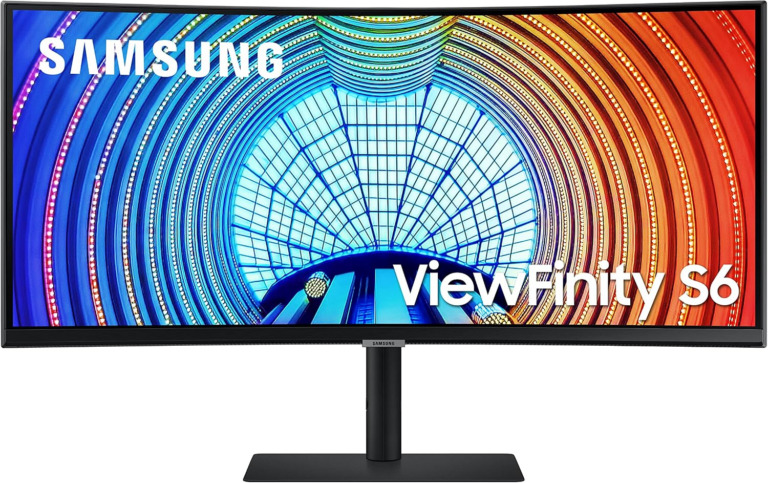
Samsung’s 34-inch ViewFinity S65UA Curved Ultrawide Monitor has slid to $299.99 on Amazon’s product listing — its lowest publicly available price on record — making this the strongest buying window in the monitor’s history for professionals, remote workers, and productivity-focused users who want a premium 21:9 display without a premium price tag. The current price undercuts the $539.99 list price by 44 percent.
This is not just another 30-or-40-percent flash markdown. The $299.99 figure is meaningful because of what came before it. The S65UA spent most of 2024 trading between $350 and $540, with occasional dips to $329.99 in December 2024. It reached $349.99 during a September 2025 promotion. It briefly hit $299.99 in early 2026. The current listing matches that floor and is confirmed live following Amazon Prime Big Deal Days that ran October 6 and 7.
One thing buyers should know before clicking: Amazon’s product listing has a documented mislabeling as IPS when every independent specification source — including Samsung’s own product documentation — confirms it uses a VA (Vertical Alignment) panel. The distinction matters, and the next section explains why.
VA panels offer one genuinely superior advantage over IPS alternatives at this price: contrast ratio. The S65UA delivers a 3,000:1 static contrast ratio, which produces significantly deeper blacks than the 1,000:1 ratio typical of IPS monitors in this price range. In dark scenes — gaming environments, film content, any software with a dark theme — the difference is visible without side-by-side comparison.
The trade-offs are equally real. VA panels have a slower pixel response time (5ms on the S65UA) compared to IPS displays, which routinely reach 1ms. For heavy-action gaming at 100Hz, that 5ms figure can produce subtle motion blur or “smearing” on fast-moving objects. The S65UA’s 100Hz refresh rate is better than the 60Hz standard and smooth enough for casual gaming, but it was not engineered for competitive play. For productivity, content creation, and light gaming, the response time is a non-issue.
Viewing angles are another consideration: VA panels can show color shifts when viewed from off-axis positions — noticeable if you share your screen with someone standing to the side, or if you sit far off-center.
The buyer profile this monitor is built for: someone who works at a desk, looks at the screen straight-on, values deep blacks and high contrast over raw response speed, and wants the desk-clearing benefit of a single wide display replacing two monitors.
The S65UA (model LS34A654UBNXGO) is a 34-inch VA LCD with a 3,440 × 1,440 Ultra-WQHD resolution at a 21:9 aspect ratio, curved to a 1000R radius. The panel runs at 100Hz with AMD FreeSync for tear-free adaptive refresh, supports HDR10 (see the note below on what that means at 350 nits), and reaches a peak brightness of 350 nits. Connectivity includes one USB-C port with 90W Power Delivery, one HDMI, and one DisplayPort. The stand is height-adjustable with tilt and swivel; the monitor is VESA 100×100mm compatible.
Why 90W USB-C matters: The USB Power Delivery protocol negotiates a power contract between device and monitor, allowing the S65UA to simultaneously carry DisplayPort video signal and 90W of charging power over a single cable. That is enough to charge most thin-and-light laptops — including MacBook Air models, Dell XPS 13, and similar mid-range business notebooks — while running video at full resolution, eliminating the separate power adapter from your desk setup.
A note on HDR10 at 350 nits: The S65UA supports HDR10, which is the baseline HDR standard for accepting high-dynamic-range content. However, meaningful HDR requires a minimum of 400 nits to qualify for DisplayHDR 400 certification — the lowest tier of hardware-verified HDR performance. At 350 nits, the S65UA can receive and display HDR-flagged content, but the display cannot render the full brightness range those files contain. If HDR visual quality is a primary concern, this monitor’s implementation is a spec-sheet entry rather than a premium HDR experience.
The TÜV Rheinland eye-care certification is independently meaningful: it is not a marketing label Samsung self-applies, but a verification by a third-party German testing organization that the monitor meets objective standards for low blue-light output and flicker-free operation.
The “1000R” designation means the monitor panel traces part of a circle with a 1,000mm (roughly 3.3 ft) radius. The ergonomic argument is geometrically sound: at a typical monitor viewing distance of 60 to 80 centimeters (about 24 to 31 inches), a 1000R curve places every point on the 34-inch display at approximately the same distance from your eyes. On a flat 34-inch ultrawide, the far edges are measurably farther away than the center — your eyes must continuously refocus. The curve is designed to eliminate that refocusing demand over long sessions.
The practical benefit is most apparent during extended work sessions rather than short tasks. Casual users may not notice the ergonomic difference immediately, but people who spend four or more hours at the display daily generally report reduced visual fatigue compared to flat ultrawides.
A 34-inch ultrawide at 3,440 × 1,440 provides roughly the same horizontal pixel count as two 1,920 × 1,440 monitors placed side by side, without the physical gap, mismatched bezels, or independent height adjustments of a multi-monitor configuration. Apps like web browsers, spreadsheets, email clients, and code editors can each occupy a proper window at full or near-full size without any content compromise.
The practical advantage is desk space and cable reduction. At $299.99, the S65UA represents a meaningful step down from the $400-plus territory this category has occupied for most of the past two years, and it remains a Samsung-tier product with a known warranty structure (though readers should note the community-reported experience: Samsung’s dead pixel replacement policy requires five or more dead pixels to trigger a warranty replacement — a policy that some buyers have found frustrating if individual pixels fail within the first year).
At $299.99, the S65UA competes with LG’s 34WQ650-W (an IPS ultrawide at roughly the same price point) and Acer’s EI342CK P (a higher-refresh VA panel at slightly more). The Samsung’s advantages over those alternatives are the tighter 1000R curve, the 90W USB-C charging, and the TÜV certification. Buyers who prioritize color accuracy over contrast should lean toward IPS competitors; buyers who want the single-cable desk setup and the deeper blacks that VA delivers at this size will find the S65UA compelling at this price.
| Date | Price | Notes |
|---|---|---|
|
Launch / List Price |
$539.99 |
Samsung MSRP |
|
September 2025 |
$349.99 |
Expired Amazon promotion |
|
December 2024 |
$329.99 |
Expired Amazon promotion |
|
January 2026 |
$299.99 |
Public low first documented |
|
October 9, 2026 |
$299.99 |
Current Amazon price — lowest on record |
It is a VA (Vertical Alignment) panel. Amazon’s product listing has historically and incorrectly described this monitor as IPS — a discrepancy noted by multiple buyers and hardware communities. Samsung’s own product documentation and independent hardware databases all confirm the S65UA uses VA technology. VA gives it a 3,000:1 contrast ratio that IPS panels at this price cannot match, with the trade-off of a slower 5ms response time and off-axis color shift.
Yes, for most mainstream thin-and-light laptops. The S65UA’s USB-C port uses the USB-C Power Delivery at 90W, which covers MacBook Air models (M1–M4 require 30–45W; MacBook Pro 14-inch requires up to 96W with the display active, so very high-performance tasks may charge slowly or hold steady rather than gaining battery while driving the monitor). Dell XPS 13, HP Spectre, Lenovo ThinkPad X1 Carbon, and similar business ultrabooks all charge comfortably at 90W through a single cable. Check your laptop’s USB-C PD specification before purchase if you are unsure.
HDR10 is the baseline high-dynamic-range standard and requires the monitor to accept HDR-formatted content. However, delivering the visible punch of HDR — where bright highlights genuinely glow and dark shadows genuinely deepen — requires peak brightness above 400 nits (DisplayHDR 400 certification is the minimum certified tier). The S65UA’s 350-nit ceiling means it can process HDR signals but cannot render the full highlight range of HDR content. Streaming HDR video or playing HDR games on this monitor will look good, but it will not look different from a well-calibrated non-HDR display the way a 600- or 1,000-nit panel would.
The lower the number, the tighter the curve. A 1000R curve bends more aggressively than an 1800R curve. Samsung’s 1000R is specifically designed to match the estimated curvature of the human visual field at typical desk viewing distances (roughly 60 to 80 centimeters). In practice, 1000R is the most immersive curve available on a mainstream consumer monitor and best-suited to users who work at a consistent distance from the display. Users who sometimes view from further away, or who share the screen with a colleague, may find a flatter 1800R more forgiving.
TechTimes participates in affiliate programs. Purchases made through links in this article may generate a commission at no cost to the reader. Prices are accurate at the time of publication and are subject to change. Samsung ViewFinity S65UA on Amazon