HomeAuto Dell 15 With Core Ultra 7 255U Drops to $1,299 on Amazon: Arrow Lake-U at Last Year’s Prices
Dell 15 With Core Ultra 7 255U Drops to $1,299 on Amazon: Arrow Lake-U at Last Year’s Prices
October 13, 2026:
Amazon.com
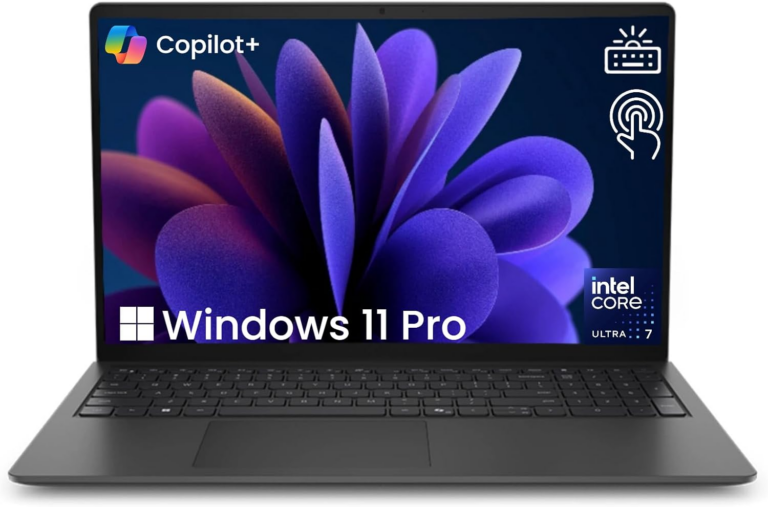
A limited-time Amazon deal is cutting roughly $700 off the 2026 Dell 15.6-inch FHD Touchscreen Business Laptop — a machine built around Intel’s newest Arrow Lake-U processor — bringing it to $1,299.98, down from its listed retail price of $1,999.99 (approximately 35% off).
That discount puts 32GB of DDR5 memory, a 1TB PCIe NVMe SSD, Windows 11 Pro, and Intel’s Core Ultra 7 255U processor in reach for under $1,300 — a combination that would have been difficult to find at this price as recently as early 2025. The deal is available now via Amazon and is expected to remain active for approximately two weeks, though limited-time pricing can change at any time.
A note before buying: this listing is fulfilled by a third-party Amazon marketplace seller, not by Dell or Amazon directly. Always verify the seller’s rating and return policy before completing a purchase in this category.
What Is the Intel Core Ultra 7 255U — and Why Does the Architecture Matter?
The 255U is the top chip in Intel’s Arrow Lake-U line, the U-series entry in the company’s Core Ultra Series 2 family. It was introduced in January 2025 and represents Intel’s first major mobile chip family with its compute tile manufactured on TSMC N3B 3nm-class process — a fabrication process also used by Apple’s M3 series — rather than on Intel’s own fabs.
The architecture is not a conventional monolithic die. Instead, the 255U uses a tile/chiplet design in which the compute tile — containing the CPU cores and manufactured on the TSMC N3B node — is physically separate from the SoC and I/O tiles, which handle memory controllers, connectivity, and platform integration. This separation is the key engineering decision that allows the 255U to hit 5.2 GHz burst within a 15-watt base power envelope.
The core layout inside the compute tile is a three-tier hybrid:
2 Redwood Cove performance cores (P-cores) with hyperthreading, clocking up to 5.2 GHz
8 Crestmont efficiency cores (E-cores), clocking up to 4.2 GHz
2 additional low-power Crestmont (LP-E) cores, clocking up to 2.4 GHz, housed on a separate low-power island
The LP-E island is why the 255U can feel responsive on battery even when the machine is doing almost nothing. During idle and light tasks — email, calendar, light browsing — the entire compute tile can deactivate, and the LP-E cores carry the load at near-silent power draw. The P-cores and E-cores only spin up when workload demands it. This is the architectural mechanism that makes a 15-watt chip capable of 57-watt burst without battery drain at rest.
The memory specification is 12MB of L3 cache and support for dual-channel DDR5 at up to 6,400 MT/s. This Dell unit runs DDR5 at 5,600 MT/s — within spec, and slightly below the chip’s maximum supported speed, which is a standard OEM decision that has no measurable impact on productivity workloads.
Performance versus the previous generation: Independent benchmark testing by Notebookcheck found the Core Ultra 7 255U delivers approximately 30% faster multi-thread performance and 10 to 15% faster single-thread performance compared to its Meteor Lake predecessor, the Core Ultra 7 155U. That improvement comes primarily from the TSMC N3B process enabling higher clock rates at the same power envelope.
What Arrow Lake-U Also Builds In: The On-Device AI Engine
An architecture note the product marketing underplays: the 255U includes a dedicated Neural Processing Unit — Intel AI Boost 12 TOPS NPU — built into the chip’s SoC tile, rated at 12 trillion operations per second.
For a business buyer in 2026, this matters in practical terms. The NPU handles AI inference tasks locally rather than routing them to the cloud: real-time noise cancellation on video calls, background removal and blur in meeting software, AI-accelerated document summarization in Microsoft Copilot, and on-device inference for applications that use Windows Copilot+ features. Tasks that previously required an internet connection and a cloud service can run directly on the machine, with no data leaving the device.
This is lower NPU throughput than what Qualcomm’s Snapdragon X Elite delivers in competing thin-and-light machines (45+ TOPS), and users planning to run heavy local AI workloads — large language model inference, video upscaling pipelines — should compare those specs directly. For mainstream business AI tasks, 12 TOPS is sufficient.
The AI Copilot key on the keyboard provides one-touch access to Microsoft Copilot, tying the hardware NPU capability to a visible daily workflow trigger.
14.11 in × 9.27 in × 0.75 in (35.8 cm × 23.6 cm × 1.9 cm)
Weight
4.28 lbs (1.94 kg)
What Arrow Lake-U Gets Right for Productivity
The 255U’s tile architecture was designed around the workload profile of an office-class machine: long periods of near-idle use interrupted by burst demands from Office apps, video calls, browser-intensive research, or database queries. In that profile, the LP-E island handles the quiet hours, and the P-cores handle the bursts, without the machine spending idle time running hot cores at unnecessary power levels. Battery-to-burst efficiency is the defining design goal.
With 32 GB of DDR5 at 5,600 MT/s, this machine handles the multitasking workloads that stress 16 GB configurations: virtual machines, simultaneous Office and browser sessions, communication apps running alongside data analysis tools. The DDR5 bandwidth — approximately 89 GB per second in dual-channel mode — also directly benefits the integrated Arc GPU, which draws from system memory rather than dedicated VRAM.
Windows 11 Pro is a genuine business feature, not a marketing upgrade. BitLocker encryption, Remote Desktop, Hyper-V virtualization, and Group Policy management are all Pro-only capabilities administrators depend on that small business owners and IT teams require.
The display: The 15.6-inch WVA panel delivers Full HD resolution at 220 nits — acceptable for indoor office use and dimly lit travel environments, but noticeably limited in direct sunlight or near windows. The touchscreen layer adds flexibility for annotation and presentation navigation. For those who depend on color accuracy for design work, this panel is not professionally calibrated; it is a productivity-class display.
Does the Integrated GPU Disqualify This Machine for Anything?
Yes — and this is the most important engineering tradeoff to understand before buying.
The 255U’s integrated Arc GPU contains 4 Xe compute cores clocked at up to 2,100 MHz. Independent benchmark comparisons show this configuration performs at roughly the same level as Intel’s older Iris Xe 96 EU integrated graphics — sufficient for office software, 1080p video playback, light photo editing, and casual 2D gaming, but significantly below the Arc iGPU in Intel’s H-series chips (which pack 8 Alchemist+ cores).
For GPU-dependent workloads — AAA gaming, real-time 3D rendering, GPU-accelerated ML training, professional video editing at scale, or computational fluid dynamics — this machine is not designed for those use cases, and it will not compete with machines carrying discrete Nvidia or AMD graphics. A buyer whose workflow depends on GPU throughput should budget for a laptop with a dedicated GPU, which typically adds $200 or more to the price.
The integrated GPU’s shared memory dependency also means that graphics performance scales with memory speed, not a dedicated VRAM pool. That is a structural, not a remedied, constraint.
One connectivity note: this chip natively supports Wi-Fi 6E and optional Wi-Fi 7, but this Dell unit ships with standard Wi-Fi 6. Buyers in environments with Wi-Fi 6E or 6 GHz band infrastructure will not reach those networks’ maximum speeds from this machine.
How Does the $1,299 Price Fit the Broader Market?
For business-class context: the HP EliteBook 6 on Amazon with the same Intel Core Ultra 7 255U processor, 32 GB of RAM, and 1 TB of storage is currently available at approximately $1,499 — $200 more than this Dell, with a larger 16-inch display and Thunderbolt 4 connectivity. Dell 15 on Newegg Business carries third-party bundled variants of this Dell configuration in a range roughly matching the $1,200–$1,400 window for 32 GB DDR5 / 1 TB configurations.
The hardware value in this Dell unit at $1,299.98 is real: Arrow Lake-U at full 32 GB DDR5 / 1 TB / Windows 11 Pro is not a common combination at this price. The trade-offs against the HP EliteBook are the smaller 15.6-inch form factor, HDMI 1.4 (versus Thunderbolt 4 on the HP), and the plastic chassis instead of a machined-metal body.
Who Should Buy This?
This Dell is a strong fit for small business owners, remote and hybrid workers, IT professionals managing Windows Pro environments, and graduate or professional students who run demanding productivity software without needing GPU throughput. The 32 GB DDR5 configuration handles virtual machines, large dataset manipulation in Excel or Python, and simultaneous multitasking that would slow a 16 GB machine.
It is not a fit for graphic designers requiring display color accuracy, content creators editing 4K video, developers running GPU-accelerated inference locally, or anyone who games on their business machine.
Is the Dell 15 Good for Business?
Yes, for the right definition of “business.” The machine is built around productivity-class multitasking, Windows Pro manageability, and a battery-efficient architecture that suits long work days. The Arrow Lake-U chip’s power management design — specifically the ability to deactivate the compute tile during light tasks — means the machine runs quiet and cool when the workload allows it.
For businesses that depend on GPU workloads or need Thunderbolt connectivity for high-bandwidth peripherals, a step up the product stack is warranted.
Should You Buy a Laptop With Integrated Graphics?
For most business and productivity buyers: yes, in 2026. The integrated Arc GPU in the 255U handles office software, video calls, web browsing, light photo work, and 1080p media without issues. The performance gap that mattered for general use between integrated and discrete graphics in 2020 has narrowed substantially as integrated GPU capability has improved generation over generation.
The remaining gap that matters: anything GPU-compute-intensive (ML training, 3D rendering, gaming above casual settings) still requires dedicated graphics. The decision to buy integrated-only is a statement about what a machine’s workload is.
Frequently Asked Questions
Does the Intel Core Ultra 7 255U handle multitasking and virtual machines?
Yes. The 12-core hybrid design with 32 GB of DDR5 handles demanding multitasking environments well. The two P-cores clock up to 5.2 GHz for burst performance, while the eight E-cores and two low-power efficiency cores manage sustained background tasks without unnecessary power draw. Running a virtual machine alongside Office and browser applications is within this machine’s design profile.
What is Intel AI Boost and does it matter for everyday business use?
Intel AI Boost is the on-chip NPU (Neural Processing Unit) built into the Core Ultra 7 255U, rated at 12 trillion operations per second (12 TOPS). It handles AI inference tasks locally — without cloud connectivity — including real-time noise cancellation in video calls, background removal in meeting software, and on-device Copilot features in Windows. For a professional who frequently uses video conferencing or AI-assisted writing tools, it reduces dependence on a network connection for those features to function. It is not powerful enough for heavy local ML workloads, which require higher-TOPS NPUs or dedicated GPU acceleration.
What does Arrow Lake-U architecture change compared to previous Intel mobile chips?
Arrow Lake-U is Intel’s first mobile chip family with its compute tile manufactured on TSMC’s N3B process — a 3nm-class node that previously appeared in Apple’s M3 chips. The manufacturing upgrade enables higher clock speeds at the same power envelope: the 255U boosts to 5.2 GHz, compared to approximately 4.8–4.9 GHz for the previous-generation Core Ultra 7 155U, resulting in approximately 30% multi-thread speed improvement and 10 to 15% faster single-thread performance. The architecture also introduces a low-power core island that can deactivate the main compute tile entirely during light tasks, extending battery life in real-world use patterns.
Is this an actual discount, or is the original price inflated?
Third-party deal tracking sites show the comparison price for this configuration at approximately $1,999.99, making the current discount approximately 35% off — or roughly $700 in savings. This is a meaningful but not unprecedented reduction for this class of hardware. Verify current pricing directly on Amazon before purchasing, as marketplace prices for this product vary by seller.
Prices and availability are subject to change. TechTimes may earn a commission from purchases made through affiliate links in this article.