October 12, 2026:


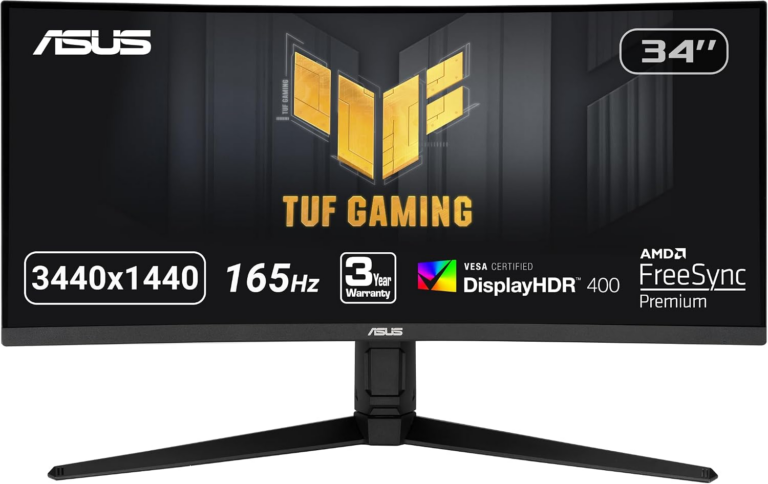
The ASUS TUF Gaming VG34VQL1B — a 34-inch curved UWQHD gaming monitor that debuted with a $369 MSRP — is currently available on Amazon for $249.99, placing it within $21 of its all-time historical Amazon price data low of $229 (reached briefly in May 2025) and well below its confirmed long-run average price of approximately $343. Prices and availability are subject to change; check the product page before purchasing.
What makes this deal worth examining beyond the price tag is what it actually buys: a VA panel at 3440×1440 with 165Hz and a full ergonomic stand — and a set of technical tradeoffs that competing deal articles consistently omit. Before clicking through, here is what the spec sheet tells you and what it does not.
The VG34VQL1B uses a Vertical Alignment (VA) LCD panel. In VA technology, liquid crystals stand vertically in their default “off” state, blocking backlight light more completely than IPS (In-Plane Switching) crystals can — see VA panel technology overview for the full technical breakdown. That physical difference is why this monitor’s 4000:1 native contrast ratio is achievable at this price point, while a comparable 34-inch IPS panel in the same class would typically offer 800:1 to 1000:1. On a monitor this size, that gap shows — especially in dark gaming environments, atmospheric titles, and any scene with a mix of bright highlights and shadow detail.
The cost tradeoff is equally rooted in physics: the same vertical crystal orientation that produces deep blacks also makes certain pixel transitions slower. When a pixel must move from a near-black state to a mid-gray, the crystal requires more energy and time to shift compared to IPS. The visible result is “black smear” — a trailing artifact behind fast-moving objects against dark backgrounds. Independent testing at Rtings.com confirms black smear on VA panels is a persistent characteristic of VA panels, including modern high-refresh models, rather than a defect correctable by firmware or overdrive settings alone.
For single-player games, strategy titles, racing sims, RPGs, and cinematic experiences, VA’s contrast advantage dominates the user experience. For competitive shooters where fast-moving dark objects on darker backgrounds are common, the tradeoff deserves attention.
The spec sheet lists “1ms (MPRT)” response time. This figure deserves a direct explanation, because it describes something different from what most buyers expect.
MPRT — Moving Picture Response Time — measures how long a pixel remains visible to the eye during motion, not how fast the pixel physically transitions between colors; the MPRT vs GtG explained reference on Blur Busters covers the full distinction. The VG34VQL1B achieves 1ms MPRT through ASUS’s Extreme Low Motion Blur (ELMB) technology, which strobe-pulses the backlight off between frames. When the backlight is dark during a frame transition, the eye cannot perceive the pixel changing — so the perceived motion blur approaches 1ms even when the panel’s actual gray-to-gray (GtG) pixel transition time is higher.
The critical practical constraint: ELMB and Adaptive-Sync (FreeSync Premium, G-Sync Compatible) cannot operate simultaneously on this monitor. To use ELMB and its 1ms motion blur reduction, variable refresh rate must be disabled. To use FreeSync or G-Sync Compatible mode to eliminate screen tearing, ELMB must be off. In most gaming setups — particularly at 165Hz where VRR provides a meaningful benefit — players will choose Adaptive-Sync and live with the panel’s native GtG performance, which is higher than 1ms. This is not unique to the VG34VQL1B; it applies to the entire category of VA ELMB monitors.
For the target buyer — someone who plays immersive, slower-paced games in a darkened room, values contrast, and will use FreeSync or G-Sync — this is a minor footnote. For buyers specifically chasing the “1ms” spec for competitive play with VRR enabled, the real-world experience will not match that number.
| Spec | Detail |
|---|---|
|
Panel Size |
34 inches / 86.4 cm (31.4 × 13.1 in / 79.7 × 33.4 cm active area) |
|
Panel Type |
VA (8-bit) |
|
Resolution |
3440 × 1440 (UWQHD / 21:9) |
|
Refresh Rate |
165Hz (144Hz also supported) |
|
Response Time |
1ms MPRT (via ELMB backlight strobing); GtG not separately specified |
|
Peak Brightness |
550 cd/m² (nits) |
|
Contrast Ratio |
4000:1 native |
|
Color Gamut |
120% sRGB / approximately 90% DCI-P3 |
|
HDR |
VESA DisplayHDR 400 |
|
Curvature |
1500R |
|
Variable Refresh |
AMD FreeSync Premium; NVIDIA G-Sync Compatible (not simultaneously with ELMB) |
|
Ports |
2× DisplayPort 1.4, 2× HDMI 2.0, USB hub (3 ports), 3.5mm audio |
|
Ergonomics |
Tilt, swivel, height adjustment |
|
VESA Mount |
Yes |
|
Built-in Speakers |
Yes (2W × 2) |
|
MSRP |
$369.00 |
Note on color spec: The ASUS official specs page specifies 120% sRGB coverage, meaning the color gamut exceeds the sRGB standard by 20%. This is a broader claim than 100% sRGB and makes this monitor meaningfully useful for content creation work alongside gaming.
The VESA DisplayHDR 400 certification is the entry tier of VESA’s standardized HDR testing framework, introduced in 2017 to give consumers a verifiable minimum performance benchmark — full requirements are published on the VESA DisplayHDR official specification page. The certification confirms a minimum 400-nit peak brightness, 90% sRGB color gamut minimum, and 8-bit color depth. It does not require local dimming or zone-level brightness control.
In practice, DisplayHDR 400 on a standard LCD produces a modest improvement over SDR, with brighter highlights but limited shadow contrast in dark scenes because the entire backlight must dim or brighten together. The VG34VQL1B’s 550-nit peak exceeds the 400-nit floor, and its 4000:1 native VA contrast partially compensates for the absence of local dimming — meaning dark scenes stay dark even without per-zone brightness control. The effect is more convincing than what DisplayHDR 400 typically delivers on a low-contrast IPS panel.
ASUS includes two HDR presets via the OSD: ASUS Cinema HDR, oriented toward saturated colors, and ASUS Gaming HDR, tuned to preserve shadow detail. For the best dark-room gaming experience at this price, ASUS Gaming HDR is the more practically useful of the two.
According to publicly available price tracking data for the Amazon listing (ASIN B08LCMYT54), the VG34VQL1B’s historical pricing breaks down as follows:
At $249.99, the monitor sits $21 above its all-time floor and roughly $93 below its long-run average. For buyers who missed the May 2025 flash sale, this represents the next-best documented price point.
In the broader 34-inch ultrawide 1440p market at this price range, the primary alternatives include the Samsung Odyssey G5 34-inch (165Hz VA, shallower 1000R curve, lower peak brightness at approximately 250 nits), the AOC CU34G2X (144Hz VA, regularly discounted to $250-$280), and LG’s 34WP65C-B (160Hz VA, USB-C connectivity). The VG34VQL1B distinguishes itself in this group with its 550-nit brightness ceiling, full height-adjustable ergonomic stand (absent on some competitors at this price), dual DisplayPort 1.4 inputs, and the ASUS software ecosystem including Shadow Boost and GameVisual presets.
The 1500R curvature means a full circle using this display’s radius would measure 1,500mm (approximately 59 inches) across. At normal desk viewing distance (60-70cm / 24-28 inches), the panel’s curve places screen edges geometrically equidistant from the viewer’s eye, reducing the need to refocus across the screen’s width. This is more practical on a 34-inch ultrawide than it would be on a narrower 27-inch display, where the perceived curve benefit is less pronounced.
The stand provides full tilt, swivel, and height adjustment, plus VESA mount compatibility for arm mounting. For a monitor at this price, a fully adjustable stand is notable — several competing 34-inch ultrawides in this range ship with tilt-only stands.
The monitor ships with ASUS’s GamePlus overlay — accessible via a dedicated hardware button — offering in-game enhancements including customizable crosshair overlays, an FPS counter, and a timer. Shadow Boost adjusts local brightness in dark screen areas to improve visibility in shadow-heavy environments without blowing out bright areas. GameVisual provides preset color profiles tuned to FPS, RTS, Racing, RPG, MOBA, and Scenery modes. Flicker-Free backlight technology and a low blue light mode support extended-session comfort.
At $249.99, the ASUS TUF Gaming VG34VQL1B offers a historically strong price for a 34-inch 3440×1440 display with a full ergonomic stand, 550-nit peak brightness, 120% sRGB color coverage, and FreeSync Premium support with proven G-Sync compatibility. Its VA panel delivers the contrast ratio that makes large curved ultrawides genuinely immersive in single-player and cinematic gaming — the same physics that sets a ceiling on its dark-transition response time when running with Adaptive-Sync enabled. Understanding that tradeoff makes the purchase decision straightforward for buyers whose gaming priorities align with what VA technology does well.
Buy on Amazon now
Prices and availability are subject to change. TechTimes may earn a commission from qualifying purchases made through links in this article.
Neither is objectively better — the right choice depends on what you play. VA panels produce higher native contrast ratios (4000:1 is typical at this tier) and deeper blacks, making them stronger for dark, cinematic, or atmospheric game environments. IPS panels offer wider viewing angles, more consistent color at off-axis positions, and typically faster gray-to-gray pixel transitions, giving them an edge in fast-paced, well-lit competitive games. For most single-player and immersive gaming, VA’s contrast is the more noticeable improvement. For fast competitive shooters in dark scenes, IPS (or OLED) is the more forgiving choice.
Yes, but modestly. VESA’s VESA DisplayHDR 400 standard confirms a minimum 400-nit peak brightness, HDR10 support, and global dimming capability — but not local zone dimming. On a VA panel with 4000:1 native contrast, HDR mode adds visible highlight brightness without the washed-out shadows common on lower-contrast IPS panels at this tier. It is meaningfully better than HDR labeling on monitors that lack VESA certification. For dramatic HDR impact, DisplayHDR 600 or DisplayHDR True Black (OLED) panels deliver a more pronounced effect.
No. The 1ms response time is achieved through ELMB (Extreme Low Motion Blur) backlight strobing, which cannot operate simultaneously with Adaptive-Sync (FreeSync/G-Sync Compatible) because both technologies require control over backlight timing and they conflict. In practice, most buyers will use the monitor with Adaptive-Sync enabled for tear-free variable framerate gameplay, and ELMB disabled. The gray-to-gray pixel response time with Adaptive-Sync enabled will be higher than 1ms, though at 165Hz the per-frame window is approximately 6ms — still fast enough for smooth gameplay in most titles.
Yes. While the monitor carries AMD FreeSync Premium certification, ASUS confirms NVIDIA G-Sync Compatible certification with NVIDIA GeForce GTX 10 series, GTX 16 series, RTX 20 series, and newer graphics cards. This means variable refresh rate is available to both AMD and NVIDIA GPU owners.