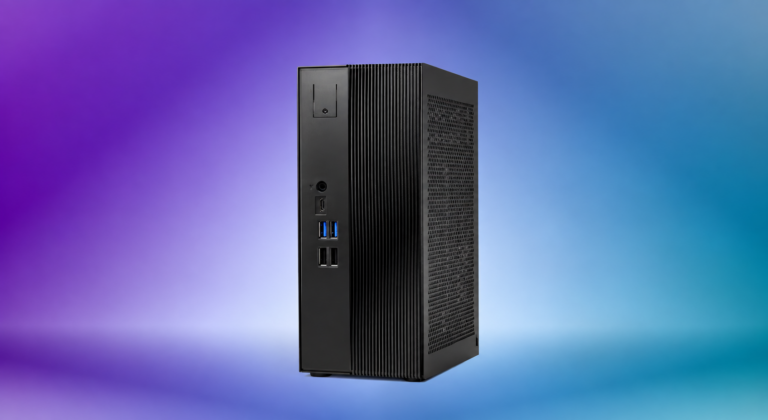
ASRock DeskSlim Brings RTX Pro Blackwell GPU Support to Compact Desktop

October 6, 2026:

ASRock DeskSlim Brings RTX Pro Blackwell GPU Support to Compact Desktop
ASRock DeskSlim X600
Asrock.com

ASRock has confirmed that its DeskSlim X600 and DeskSlim B760 compact desktop platforms officially support NVIDIA’s RTX PRO 4000 Blackwell SFF Edition and RTX PRO 2000 Blackwell professional graphics cards — bringing a category of GPU that previously required a mid-tower workstation into a chassis roughly the size of a hardback dictionary. For engineers, CAD designers, and professionals running local AI inference who cannot justify a full-tower system, the pairing now represents a meaningful option that warrants close technical scrutiny before any purchase decision.

What Makes a Workstation GPU Fit in Less Than Five Liters

The answer to how ASRock achieves this combination reveals several deliberate engineering compromises that buyers should understand before configuring a system.

The RTX PRO 4000 Blackwell SFF Edition is a half-height, dual-slot card measuring 6.6 inches by 2.7 inches (approximately 167.6 mm × 68.6 mm). It is physically smaller than the 200 mm clearance that the DeskSlim’s PCIe 5.0 x16 slot allows, leaving room for airflow around the card’s blower fan. That blower-style cooling — a single enclosed fan that pushes exhaust directly out through the card’s rear bracket — is the standard thermal solution for SFF professional GPUs, precisely because it does not dump heat into the chassis interior the way an open-air cooler does. In a 4.9-liter chassis running a 120–125W CPU alongside a GPU, not recirculating GPU heat is critical to sustained performance.

The second engineering choice ASRock made is an external power adapter. Rather than fitting a power supply unit inside the chassis, the DeskSlim uses an external brick — 240W as standard, 330W as the higher-configuration option. Removing the PSU from the chassis interior eliminates its heat contribution from the system’s thermal budget entirely. The tradeoff is a power brick on the desk or floor. For professional environments where thermal stability during long compute runs matters more than cable aesthetics, this is a reasonable exchange.

What the PCIe 5.0 x16 slot physically provides — and what the card physically uses — are different things worth noting. The RTX PRO 4000 Blackwell SFF connects electrically via PCIe 5.0 x8, not x16, despite the full-length x16 slot. For professional workloads dominated by GPU compute, AI inference, and rendering — where the bottleneck is VRAM capacity and Tensor Core throughput, not bus bandwidth — PCIe x8 versus x16 is not a material limitation. This is standard practice for SFF professional GPU design and consistent with how these cards are deployed in compact workstations from HP, Lenovo, and BOXX.

The Blackwell Cards: What the Specs Actually Mean

The RTX PRO 4000 Blackwell SFF Edition carries 24 GB of ECC GDDR7 memory on a 192-bit bus, delivering 432 GB/s of memory bandwidth. It delivers 770 AI TOPS of throughput — more than double its Ada predecessor’s output with the RTX 4000 SFF Ada — while maintaining the same 70W maximum power draw. Ray tracing performance is up approximately 1.7× over the Ada predecessor. NVIDIA has not publicly specified the card’s FP32 single-precision compute figure. Its silicon carries 8,960 CUDA cores with fifth-generation Tensor Cores and fourth-generation RT Cores.

The RTX PRO 2000 Blackwell takes a different profile: 16 GB of ECC GDDR7 on a 128-bit bus delivering 288 GB/s, 545 AI TOPS, and 17 TFLOPS of FP32 at the same 70W TDP. Compared to the RTX A2000 it effectively replaces in this market segment, NVIDIA claims 1.6× faster 3D modeling, 1.4× faster CAD performance, and significantly faster AI inference throughput. Independent validation of those claims in sustained workloads on compact systems had not been published as of this writing.

The presence of ECC on the GPU VRAM is significant for professional buyers. Error-correcting code memory catches and corrects single-bit errors before they propagate — important when a simulation or AI training run can take hours and a silent bit flip can invalidate the result. Buyers should note that the DeskSlim’s memory slot support varies by platform: the DeskSlim B760 supports only non-ECC DDR5 UDIMM, while the DeskSlim X600 supports both ECC and non-ECC DDR5 UDIMM, allowing buyers on the AMD platform to configure ECC system memory if their workflow demands it. The GPU VRAM is ECC-protected regardless of platform; the system memory pool depends on platform and the buyer’s DIMM selection. For workloads where both pools need integrity guarantees, the X600 platform with ECC UDIMM is the appropriate configuration.

Two Platforms, Meaningful Differences

Both DeskSlim variants share the same 95 mm × 235 mm × 220 mm chassis (approximately 3.7 inches × 9.3 inches × 8.7 inches), the same GPU slot, and the same four-slot DDR5 UDIMM configuration supporting up to 256 GB at speeds reaching DDR5-7200+ on overclocked configurations.

The DeskSlim X600, built around AMD’s AM5 socket, supports Ryzen 9000, 8000, and 7000 series desktop processors at up to 120W TDP. Its internal storage hierarchy is notably faster: one M.2 2280 slot wired to PCIe Gen 5×4 for primary NVMe storage, plus a second M.2 2280 slot running PCIe Gen 4×4. It also includes a USB4 rear port that can carry a display signal in addition to data. Video outputs are one HDMI port, one DisplayPort 1.4, and the USB4 Type-C.

The DeskSlim B760, built on Intel’s LGA1700 platform, supports 12th-, 13th-, and 14th-generation Core desktop processors at up to 125W TDP. Its storage configuration is more conventional: two M.2 2280 slots, both wired to PCIe Gen 4×4. It does not include a USB4 port. Its video outputs are two DisplayPort 1.4 connections plus one HDMI port. Buyers considering Intel should note the B760 platform does not support Intel’s newer LGA1851 Core Ultra desktop processors.

Both models include two SATA ports for additional storage and a 2.5 GbE LAN port with an M.2 slot for a wireless networking module.

What Professional Buyers Should Evaluate

The professional case for the DeskSlim rests on a combination of factors that do not appear together elsewhere at this form factor: socketed desktop CPUs (not soldered mobile silicon), four full-size DDR5 UDIMM slots, a PCIe 5.0 x16 expansion slot capable of hosting validated professional GPUs, and ISV certifications for the RTX Pro cards from Autodesk, Dassault Systèmes, and Siemens — a requirement in many regulated engineering and architectural workflows.

Engineers at the structural consultancy Thornton Tomasetti found the RTX PRO 2000 Blackwell ran their in-house FEA solver nearly three times faster than the RTX 2000 Ada generation and 27 times faster than a standard CPU for the same tasks. That scale of improvement on FEA workloads — the kind of sustained compute that a compact workstation would realistically handle — suggests the card’s Tensor Core and CUDA architecture translates to real-world professional throughput, not just benchmark scores.

What has not yet been independently tested is sustained performance under combined CPU and GPU load in the DeskSlim’s specific enclosure. A 4.9-liter chassis running a 120W Ryzen 9000 series processor and a 70W RTX PRO 4000 SFF simultaneously represents a 190W combined thermal load in a volume that cannot rely on large radiators or high-airflow tower coolers. ASRock’s external PSU design removes one heat source from that equation; the adequacy of the chassis cooling for the remaining CPU and GPU loads under sustained workstation conditions will require independent thermal testing.

ASRock lists the DeskSlim as VESA mount bracket ready, allowing the system to attach behind a monitor — a practical advantage in space-constrained creative or engineering studios where desk real estate is at a premium.

Availability and Pricing

ASRock confirmed the DeskSlim X600 and DeskSlim B760 are available through its global distribution network as of early October 2026, with regional availability varying by distributor. Complete system pricing — including configurations with RTX Pro Blackwell cards — had not been announced. The systems are available in barebones configuration, with CPU, memory, storage, and GPU purchased separately. RTX PRO 4000 Blackwell SFF cards are distributed through PNY and partners.

Specifications at a Glance

Specification DeskSlim X600 DeskSlim B760

CPU Socket

AMD AM5

Intel LGA1700

Supported CPUs

Ryzen 7000 / 8000 / 9000

Core 12th / 13th / 14th Gen

Max CPU TDP

120W

125W

Chassis Volume

4.9 liters

4.9 liters

Chassis Dimensions

95 × 235 × 220 mm (3.7″ × 9.3″ × 8.7″)

Same

GPU Slot

PCIe 5.0 x16

PCIe 5.0 x16

GPU Clearance

Low-profile, dual-slot, ≤200 mm

Same

Validated GPUs

RTX PRO 4000 SFF / RTX PRO 2000 Blackwell

Same

Memory

4× DDR5 UDIMM (ECC/non-ECC), up to 256 GB, DDR5-7200+ OC

4× DDR5 UDIMM (non-ECC), up to 256 GB, DDR5-7200+ OC

Primary M.2

PCIe Gen 5×4 (NVMe)

PCIe Gen 4×4 (NVMe)

Secondary M.2

PCIe Gen 4×4

PCIe Gen 4×4

SATA

2 ports

2 ports

USB4

Yes (rear)

No

Video Outputs

HDMI + DisplayPort 1.4 + USB4-C (display)

2× DisplayPort 1.4 + HDMI

Power Adapter

External 240W / 330W (optional)

Same

System Price

TBA

TBA

RTX PRO Blackwell SFF Cards: Verified Specifications

Specification RTX PRO 4000 SFF Edition RTX PRO 2000 Blackwell

Architecture

NVIDIA Blackwell

NVIDIA Blackwell

CUDA Cores

8,960

4,352

Tensor Cores

5th Generation

5th Generation

RT Cores

4th Generation

4th Generation

AI Performance

770 AI TOPS

545 AI TOPS

FP32 Performance

Not publicly specified

17 TFLOPS

GPU Memory

24 GB ECC GDDR7

16 GB ECC GDDR7

Memory Bus

192-bit

128-bit

Memory Bandwidth

432 GB/s

288 GB/s

PCIe Interface

PCIe 5.0 x8

PCIe 5.0 x8

Max Power

70W

70W

Card Dimensions

6.6″ × 2.7″ dual-slot half-height

6.6″ × 2.7″ dual-slot half-height

Display Outputs

4× Mini DisplayPort 2.1b

4× Mini DisplayPort 2.1b


Frequently Asked Questions

What workloads justify choosing the DeskSlim with an RTX PRO Blackwell card over a cheaper consumer GPU?

The RTX PRO Blackwell cards carry professional-grade drivers and ISV certifications from Autodesk, Dassault Systèmes, and Siemens — certifications that many regulated engineering and architecture workflows require. They also include ECC-protected GDDR7 VRAM, which matters for long simulation or AI inference runs where silent memory errors could invalidate hours of compute. Consumer cards like a gaming GeForce are not certified for those applications and lack ECC VRAM. If your workflow demands ISV certification or requires data integrity guarantees on GPU memory, the RTX PRO line is the appropriate choice; if it does not, a consumer GPU in the same slot will cost significantly less.

What is the difference between the DeskSlim X600 and the DeskSlim B760 beyond the CPU socket?

Beyond the AMD AM5 versus Intel LGA1700 CPU platform distinction, the X600 includes a PCIe Gen 5×4 primary M.2 NVMe slot (faster storage for active project data), a USB4 rear port, and support for ECC DDR5 UDIMM memory, while the B760 has two PCIe Gen 4×4 M.2 slots, no USB4, and supports only non-ECC DDR5 UDIMM. The B760 compensates on the display side with two full DisplayPort 1.4 connections capable of 8K output (with DSC); the X600 uses a USB4-C port to carry a third display signal. For buyers who need the fastest NVMe storage, USB4 connectivity, or ECC system memory, the X600 is the stronger choice. For those using multiple high-resolution external monitors and preferring Intel, the B760 is configured accordingly.

Does the 256 GB of system RAM have ECC protection like the GPU memory does?

It depends on the platform. The DeskSlim B760 uses non-ECC DDR5 UDIMM slots, so system memory on the Intel variant is not ECC-protected. The DeskSlim X600 supports both ECC and non-ECC DDR5 UDIMM, giving AMD-platform buyers the option to configure ECC system memory if their workflow demands full memory integrity across both the CPU and GPU memory pools. The RTX PRO Blackwell GPUs carry ECC-protected GDDR7 VRAM regardless of platform. For scientific computing or AI workloads where memory integrity across both pools is a strict requirement, the X600 platform with ECC UDIMM is the appropriate configuration. Full ECC on both system and GPU memory on an Intel platform typically requires a server-class platform.

Is the 70W GPU TDP going to create thermal problems in a 4.9-liter chassis?

It depends on workload. A 70W GPU combined with a 120–125W CPU represents up to 190–195W of combined thermal load in a chassis smaller than most kitchen appliances. ASRock’s external power adapter removes the PSU heat source from the equation, and the RTX PRO Blackwell SFF cards use blower-style cooling that exhausts heat out the card bracket rather than into the chassis. Whether sustained combined CPU-and-GPU load at peak TDP creates thermal throttling in this specific chassis has not yet been independently benchmarked. Buyers planning extended AI inference or rendering runs should wait for independent sustained thermal test results before committing to a fully loaded configuration.

Source link