iPhone Duo Apps Are Now Ready for Submission: Xcode 27.1 Requirements Explained

October 6, 2026:

iPhone Duo Apps Are Now Ready for Submission: Xcode 27.1 Requirements Explained

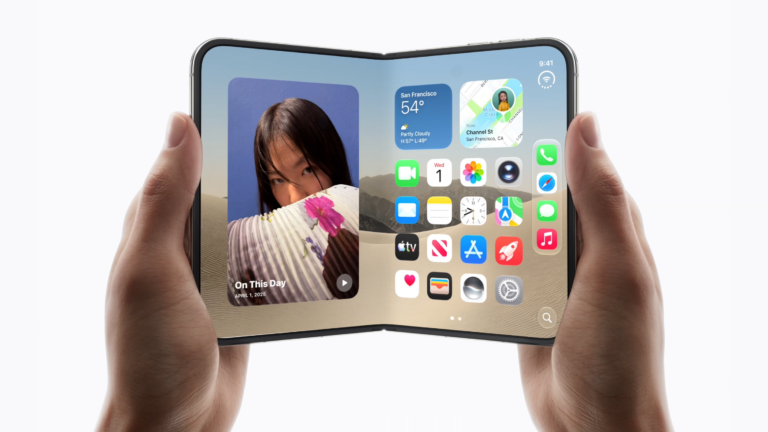
With the iPhone Duo launch approaching, Apple has started accepting submissions for apps and games optimized for its upcoming device. The change allows developers to prepare their software before the new iPhone reaches customers.

The latest development centers on Xcode 27.1, Apple’s development environment for building and testing apps. Developers who build or recompile their apps using the updated version can now submit iPhone Duo-optimized apps and games through App Store Connect.

The Cupertino giant has also introduced a future requirement for screenshots. Starting in April 2027, apps submitted to App Store Connect will need to include screenshots specifically prepared for iPhone Duo.

Developers should note that these changes mean that app preparation involves more than simply making software compatible with the new device. Product pages and visual assets will also need to meet Apple’s requirements.

Apple Begins Accepting iPhone Duo App Submissions

iPhone Duo
Apple.com

Apple has been releasing beta versions of Xcode 27.1 with tools for developing and testing apps for iPhone Duo. The company has now released Xcode 27.1 Release Candidate 1, allowing developers to work with the latest version ahead of the device launch.

The updated development environment is important because it provides support for creating or recompiling apps for iPhone Duo. Developers can use Xcode 27.1 to check how their existing software behaves on the new hardware and make adjustments where necessary.

Apple says that when an app is built or recompiled using Xcode 27.1, its App Store product page can display a badge indicating that the software has been optimized for iPhone Duo.

The badge gives potential users a simple way to identify apps that have been prepared for the new device.

What Xcode 27.1 Means For Existing Apps

Developers do not necessarily need to create an entirely new version of an existing app to begin preparing for iPhone Duo.

According to Apple, recompiling an existing application with Xcode 27.1 provides development support for the new device. This gives developers a way to begin testing compatibility and identifying areas that may require additional work.

The process can be particularly relevant for apps with complex layouts, games with demanding graphics, or software that relies heavily on specific screen orientations.

Apple is also providing developers with tools to examine how their apps respond across different device configurations.

Device Hub Helps Developers Test iPhone Duo Apps

9to5Mac reports that developers can use Device Hub to visualize how their apps behave on iPhone Duo across different poses and orientations.

This is an important part of the preparation process because an app that works correctly in one configuration may not necessarily provide the same experience in another.

Testing different orientations can reveal problems involving interface placement, navigation controls, text, images, or other elements of an app’s user interface.

For games, testing can also help developers identify potential problems with gameplay layouts and visual elements. Developers can use these checks before submitting their applications through App Store Connect.

iPhone Duo Screenshots Will Become Mandatory in 2027

One of the most important changes for developers concerns App Store Connect screenshots.

Apple says that apps and games submitted to App Store Connect will need to include iPhone Duo screenshots starting in April 2027.

The requirement gives developers additional time to prepare their App Store product pages for the new device. However, it also means that developers planning to maintain their apps beyond the deadline will need to consider iPhone Duo-specific promotional assets.

Screenshots are an important part of an App Store listing because they show potential users what an application looks like before downloading it. For that reason, developers will need to make sure their screenshots accurately represent the experience offered on iPhone Duo.

Apple Provides Design and App Store Resources

Apple has also pointed developers toward several resources intended to help with iPhone Duo preparation.

These resources cover areas such as design guidance, templates, App Store assets, app previews, and screenshot specifications.

Design guidance can help developers understand how interfaces should be prepared for the new device. Meanwhile, Apple’s asset and screenshot resources can help ensure that App Store product pages meet the required specifications.

Developers working on multiple applications may want to review these resources early. Preparing screenshots and other App Store assets can require additional design and testing work, particularly for apps with frequent updates.

Why iPhone Duo Optimization Is Important

Preparing an app for a new device can involve both technical and presentation-related changes.

On the development side, developers need to make sure their apps behave correctly on the new hardware and across supported orientations.

On the App Store side, they need to ensure that product pages accurately represent the application and comply with Apple’s asset requirements.

The iPhone Duo optimized badge could also become useful to users. By identifying apps that have been prepared for the device, Apple can make it easier for customers to determine whether developers have updated their software for the new hardware.

Apple Plans In-Person iPhone Duo Developer Workshops

Apple is also organizing in-person iPhone Duo workshops to help developers prepare their apps.

These sessions provide another opportunity for developers to learn about the platform and understand how Apple’s development tools can be used during the transition.

The workshops are particularly relevant to developers who want more direct guidance while preparing applications for the new device. Registration and additional information are available through Apple’s developer resources.

When Will the iPhone Duo Be Available?

According to the provided launch information, iPhone Duo pre-orders will begin on Friday, October 16, followed by deliveries and in-store availability starting October 23.

Apple has also announced that customers can begin preparing for iPhone Duo pre-orders from October 12.

These dates give developers a relatively short window to prepare applications ahead of the device’s arrival. Apps that are already compatible can be submitted earlier, while developers with more complex software may need additional time for testing and App Store asset preparation.

Frequently Asked Questions

What is Xcode 27.1?

Xcode 27.1 is Apple’s development environment version that provides support for building and testing applications and games optimized for iPhone Duo.

Can developers submit iPhone Duo apps now?

According to Apple, developers can submit iPhone Duo-optimized apps and games through App Store Connect after building or recompiling them with Xcode 27.1.

When will iPhone Duo screenshots become mandatory?

Apple says that App Store Connect submissions will require iPhone Duo screenshots starting in April 2027.

What is Device Hub used for?

Device Hub allows developers to visualize how their apps behave on iPhone Duo across different poses and orientations.

Do existing apps need to be completely rebuilt for iPhone Duo?

Not necessarily. Apple says developers can recompile existing apps using Xcode 27.1 to add development support for iPhone Duo.

When will iPhone Duo pre-orders begin?

Based on the provided launch information, iPhone Duo pre-orders will begin on October 16, with deliveries and in-store availability starting October 23.

How can developers prepare their App Store product pages?

Developers can review Apple’s design guidance, App Store asset resources, app preview specifications, and screenshot specifications while preparing their iPhone Duo product pages.

Source link