iPhone 18 Pro Face ID Bug Reboots Phone at Kernel Level: In-App Scans Only

September 22, 2026:

iPhone 18 Pro Face ID Bug Reboots Phone at Kernel Level: In-App Scans Only
iPhone Face ID
Apple.com

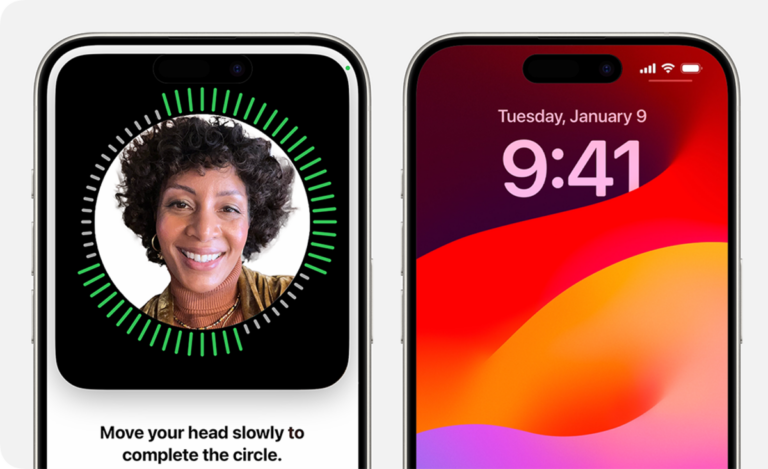
Days after Apple shipped its most technically ambitious iPhone in years, early buyers of the iPhone 18 Pro discovered that the device’s redesigned Face ID system crashes and reboots their phone — not when they simply fail to unlock it, but specifically when they attempt to use Face ID inside apps to access locked content. The failure mode, confirmed and reproduced by 9to5Mac on at least one European unit, generates kernel-level diagnostic logs and represents the first documented stress test of Apple’s new under-display infrared camera architecture.

What Crashes and When

The problem is specific to a narrow code path. Face ID on the iPhone 18 Pro works normally when unlocking the device from the lock screen. The crash occurs when the phone presents an in-app authentication challenge — the pop-up that appears when a user tries to open a locked app such as Passwords, access Private Browsing in Safari, or authorize an Apple Wallet payment — and that challenge fails on the first try.

At that point, per 9to5Mac’s reproduction steps, a user who covers their face to simulate a failed scan, then taps “Try Face ID Again,” will trigger the failure: the phone locks up, stops responding to all touch input, and then reboots to the lock screen.

Reports first surfaced on Reddit within days of the September 18 launch, with users on both the international iPhone 18 Pro subreddit and South Korea’s Asamo iPhone community describing repeated reboots. Of 24 direct responses in one Reddit thread tracked by Macworld, 22 confirmed experiencing the same or a similar problem. MacRumors additionally identified two adjacent issues in its user forums: some owners received a “Face ID is Not Available” error when attempting the initial Face ID setup, and others reported that the “Require Attention for Face ID” setting was not being consistently respected.

One Pro Max owner reported the phone restarting three times in a single day due to Face ID failures, including once during an Apple Wallet transaction, and made a call to Apple support. Another user described around five crashes and reboots, each accompanied by a “panic-full” log — a diagnostic record indicating a kernel-level failure, the category of system error reserved for unrecoverable OS faults.

The distinction between an app crash and a kernel panic matters. An app crash is contained; the OS handles it gracefully, kills the process, and returns to the home screen. A kernel panic is qualitatively different — the OS itself encountered a condition it could not handle and forced a hard reboot to recover. That these kernel panics are triggered by a biometric authentication challenge, rather than by memory corruption or a runaway process, points squarely at the interface between the new sensor hardware and the iOS 27 driver stack that manages it.

How Apple Redesigned Face ID — and What Changed

To understand why this code path is vulnerable, it helps to understand what Apple changed in the iPhone 18 Pro’s Face ID hardware.

Since the iPhone X in 2017, Face ID has used a TrueDepth camera system built from three precisely aligned components housed in a single compact module: a dot projector (a vertical-cavity surface-emitting laser that projects more than 30,000 infrared dots onto the user’s face), a flood illuminator (an infrared flash), and an infrared camera that reads the resulting dot pattern. The infrared camera captures the distorted dot pattern, and the resulting 3D facial map is encrypted and sent to the device’s Secure Enclave — a hardened subsystem within the A-series chip — which compares it against the stored facial data and returns an authentication result. The app, or the OS, never touches the facial data in the Secure Enclave; it receives only a pass or fail.

On the iPhone 18 Pro, Apple moved the infrared camera out of that central module and placed it under the display in the top-left corner. A teardown published by repair channel REWA Technology showed that the repositioned camera sits farther from the rest of the TrueDepth array and is connected by three separate cables — a more complex physical arrangement than in any prior iPhone generation. The pixels directly above the camera use a modified arrangement that allows infrared light to pass through while appearing normal to the eye at typical viewing angles. The dot projector and flood illuminator remain in the Dynamic Island module, which is smaller than before; the moved infrared camera is what made the Island’s shrinkage possible.

This is the source of the architectural tension. The three TrueDepth components now operate across two physically separate locations on the device, connected by more cabling than before and with the camera reading dot patterns through a pixel overlay rather than through open air. Any iOS driver code or Secure Enclave handshake routine that was calibrated against the prior single-module geometry now operates against a different physical setup. 9to5Mac and MacRumors both speculate — and the evidence from the panic logs supports — that the in-app authentication code path was not fully exercised with this new geometry before iOS 27’s release.

Is This Hardware or Software?

Both 9to5Mac and MacRumors characterized the bug as almost certainly a software defect in iOS 27 rather than a fundamental flaw in the under-display camera hardware itself. Benjamin Mayo of 9to5Mac noted that an Apple support representative who recommended a hardware swap for one affected user was “probably” making a misdiagnosis, and that the problem would likely be fixable via a software update.

The evidence supports that framing. The crash does not occur during every Face ID interaction — only in-app challenges, and only when the first attempt fails. That specificity suggests a discrete code path rather than a broken sensor. A hardware failure in the infrared camera would more likely produce consistent failures across all Face ID interactions, not a selective crash tied to a specific authentication context.

Apple has not issued a public statement on the issue, and as of this writing no support document addressing the crash had been published. The company is testing iOS 27.2 as its next major update cycle; whether a point release addressing this specific bug will arrive before 27.2 is not known.

Scale and Scope

It is important not to overstate the problem’s reach. The iPhone 18 Pro shipped to millions of customers, and neither the Reddit threads, the MacRumors forum reports, nor the Macworld survey represent a statistically valid sample. Most iPhone 18 Pro owners have not reported this crash. 9to5Mac was explicit that the issue “does not seem to affect everyone,” and BusinessToday noted the complaints come from a limited number of users.

What the evidence does support is that the bug is real, reproducible, and specific to the iPhone 18 Pro’s in-app authentication path. For users who experience it, the disruption is significant: a device that reboots mid-payment or fails to open a locked app is not functioning as intended, particularly at a starting price of $1,199 — a $100 increase over last year’s model.

Some users have noted a separate iOS 27 reboot bug that can affect any iPhone model when swiping Notification Center and Control Center simultaneously — a distinct issue that 9to5Mac also expects to be resolved in a software update. The two problems may share root causes or may be unrelated.

Why Does an In-App Challenge Fail Differently Than a Lock Screen Unlock?

The distinction between in-app and lock-screen Face ID is not trivial. When a user unlocks the phone from the lock screen, iOS invokes Face ID through a well-tested, long-established code path that has been present and refined since iOS 11. When an app presents a Face ID challenge — for locking individual apps, a capability Apple added in iOS 18 — the request travels through a different path: the app calls a system authentication API, iOS passes the request to the biometric subsystem, the Secure Enclave handles the match, and the result is returned to the app.

That in-app challenge path is newer and, based on the iPhone 18 Pro’s behavior, appears to have been less thoroughly validated against the repositioned infrared camera’s failure-return logic. When the camera returns a failed match result under the new physical architecture, the driver handling that result triggers a kernel panic rather than a graceful authentication failure. The phone does not know how to handle the combination of “new sensor geometry” + “in-app challenge” + “failed first scan” without crashing.

What to Do If Your Phone Is Affected

For users currently experiencing reboots: Apple support has suggested resetting Face ID settings as a preliminary step. Go to Settings → Face ID and Passcode, tap “Reset Face ID,” and re-enroll your face. This will not fix the underlying software issue but may reduce crash frequency for some users.

Back up the device before any troubleshooting. Install any available iOS updates. If crashes persist after resetting Face ID and installing updates, bring the device to an Apple retail location for diagnostics — not to request a hardware replacement, which appears to be a misdiagnosis, but to ensure Apple’s support staff can log the issue and escalate it appropriately.

Ternus’s First Hardware Story as CEO

The bug arrives at a pointed moment for Apple’s new leadership. John Ternus, a mechanical engineer who spent the bulk of his career at Apple on the product and hardware side, became CEO on September 1 before delivering his first keynote nine days later at the “Surprise and Shine” event at Apple Park. That event marked Apple’s most ambitious hardware cycle in at least a decade — the iPhone 18 Pro lineup, updated Apple Watch Series 12 and Ultra 4, new AirPods 5, and a “one more thing” reveal of the iPhone Duo, Apple’s first foldable iPhone, starting at $1,999.

Ternus’s engineering background makes him well-positioned to understand exactly what the Face ID kernel panic means in architectural terms. It also means the iPhone 18 Pro is his product, built under his supervision during his years as SVP Hardware Engineering. The launch-window quality story attaches to his tenure at the moment it began.

Apple has a consistent track record of issuing point updates quickly when launch-window bugs attract widespread attention. The question the iPhone 18 Pro’s Face ID crash raises for Ternus’s first hardware cycle is not whether a patch is coming — it almost certainly is — but whether the under-display infrared camera’s integration with iOS will require ongoing software tuning as Apple iterates toward a future iPhone that hides all front-facing components, not just the infrared camera, beneath the display.


Frequently Asked Questions

Does the iPhone 18 Pro Face ID crash affect all units?

No evidence suggests the crash affects all iPhone 18 Pro and Pro Max units. Reports indicate the issue does not affect everyone, and 9to5Mac was clear that the scope is unclear. The bug surfaces specifically in in-app Face ID authentication challenges — unlocking individual apps or authorizing Apple Pay payments — not when unlocking the phone from the lock screen. If you have not experienced any reboots in those specific scenarios, your unit may not be affected.

Is the Face ID crash a hardware defect or a software bug?

Based on available evidence, the most knowledgeable reporters covering the issue — 9to5Mac and MacRumors — characterized it as almost certainly a software defect in iOS 27, not a fundamental flaw in the under-display infrared camera hardware. The presence of kernel-level (“panic-full”) diagnostic logs suggests the crash occurs on the failure-return path of the in-app authentication code, which appears not to have been fully validated against the new sensor geometry before iOS 27 shipped. Apple support’s recommendation of a hardware swap for at least one user is, in 9to5Mac’s assessment, a likely misdiagnosis.

What should I do if my iPhone 18 Pro keeps restarting after a Face ID failure?

Reset Face ID first: go to Settings → Face ID and Passcode, tap “Reset Face ID,” and re-enroll your face. Back up the device and install any available iOS software updates. If reboots persist, contact Apple Support or visit an Apple Store for diagnostics. Apple is expected to release a software patch; until it arrives, temporarily disabling per-app Face ID locking (removing the requirement to authenticate with Face ID to open specific apps) will avoid triggering the affected code path.

Why does the iPhone 18 Pro have a different Face ID design than previous models?

Apple moved the infrared camera component of the Face ID system under the display surface in the top-left corner, separating it physically from the dot projector and flood illuminator, which remain in the Dynamic Island module at the center-top of the screen. This redesign allowed Apple to shrink the Dynamic Island, creating a smaller screen interruption. The tradeoff is engineering complexity: the three TrueDepth sensor components now operate across two locations, connected by additional cabling, with the camera reading infrared dot patterns through a modified pixel arrangement rather than through open air.

Source link